среда, 31 марта 2010 г.

Evoked by "Patterns of Parallel Programming" (part 1)

One section in excellent article "Patterns of Parallel Programming" is dedicated to idiom "Speculative processing". In brief we can start multiple computation in parallel (utilizing advantages of multiple cores), take first result and ignore others. Unfortunatly F# library doesn't provide builtin primitive for this strategy. Code below contains sketch of possible solution.

open System.Threading

type Async with
static member Any(asyncs : seq<Async<'T>>) =
let value = ref false
let cts = new CancellationTokenSource()
Async.FromContinuations(fun (cont, econt, ccont) ->
// accepts result value only once, subsequent calls will be ignored
let kont v =
do lock value (fun () ->
match !value with
| true -> ()
| false ->
value := true
cts.Cancel()
cont v
)
// runs specified computation in new thread
let wrapper a = async {
do! Async.SwitchToNewThread()
return! a
}
for a in asyncs do
Async.StartWithContinuations(wrapper a, kont, econt, ignore, cancellationToken = cts.Token)
)

We wrap specified asyncs so they will be started in threadpool threads. After first successful completion result is passed to awaiting continuation and cancellation is signalled. Subsequent results (if any occured) will be ignored.

Update: post with corrected version

вторник, 30 марта 2010 г.

F# and handling ASP.NET requests

Recently I’ve browsed through the old files and occasionaly found a description of the practical task given to me when I was still a student. Objective was the following: implement simple socket based application that will listen specified port, parse incoming HTTP requests (extract uri from request treating it as file) and return content of specified file. Roughly speaking it should be primitive http server. Initiallly it was implememented  in C++ but now I wanted to solve the same task with F# with some enchancements. Fortunatly BCL offers ApplicationHost class so ASP.NET requests can be processed outside IIS

type Marshaller() = 
inherit MarshalByRefObject()
let listener = new HttpListener()
do listener.Prefixes.Add("http://+:8099/")
member this.Start() =
let processor = async {
try
while true do
let! context = Async.FromBeginEnd(listener.BeginGetContext, listener.EndGetContext)
printfn "requesting %O" context.Request.Url
Async.Start (async { HttpRuntime.ProcessRequest(HttpListenerWorkerRequest context)})
with
:? IOException as ioe -> ()
}
listener.Start()
Async.Start processor
member this.Stop() =
listener.Stop()
override this.InitializeLifetimeService() = null

let runServer virtualPath physicalPath =
let host = ApplicationHost.CreateApplicationHost(typeof<Marshaller>, virtualPath, physicalPath) :?> Marshaller
host.Start()
{ new IDisposable with
member this.Dispose() = host.Stop() }

ApplicationHost creates auxiliary domain, sets up ASP.NET infrastructure and instanciates specified type so new instance can be use to manipulate requests. With async workflows  usages of unblocking calls become trivial. Main workhorse type – custom implementation of HttpWorkerRequest that takes and stores data in HttpListenerContext.

type HttpListenerWorkerRequest(ctx : HttpListenerContext) =
inherit HttpWorkerRequest()
override this.EndOfRequest() =
ctx.Response.OutputStream.Close()
ctx.Response.Close()
override this.GetUriPath() = ctx.Request.Url.LocalPath
override this.GetQueryString() =
let idx = ctx.Request.RawUrl.IndexOf("?")
if idx = -1 then "" else ctx.Request.RawUrl.Substring(idx + 1)
override this.GetRawUrl() = ctx.Request.RawUrl
override this.GetHttpVerbName() = ctx.Request.HttpMethod
override this.GetHttpVersion() = sprintf "HTTP/%d.%d" ctx.Request.ProtocolVersion.Major ctx.Request.ProtocolVersion.Minor
override this.GetRemoteAddress() = ctx.Request.RemoteEndPoint.Address.ToString()
override this.GetRemotePort() = ctx.Request.RemoteEndPoint.Port
override this.GetLocalAddress() = ctx.Request.LocalEndPoint.Address.ToString()
override this.GetLocalPort() = ctx.Request.LocalEndPoint.Port
override this.SendStatus(statusCode, statusDescription) =
ctx.Response.StatusCode <- statusCode
ctx.Response.StatusDescription <- statusDescription
override this.SendKnownResponseHeader(index, value) =
ctx.Response.Headers.[HttpWorkerRequest.GetKnownResponseHeaderName(index)] <- value
override this.SendUnknownResponseHeader(name, value) =
ctx.Response.Headers.[name] <- value
override this.SendResponseFromMemory(data, length) =
ctx.Response.OutputStream.Write(data, 0, length)
override this.SendResponseFromFile(filename : string, offset : int64, length : int64) : unit =
use f = File.OpenRead(filename)
f.Seek(offset, SeekOrigin.Begin) |> ignore
let buf = Array.zeroCreate 1024
let read = ref length
while !read > 0L do
let bytesRead = f.Read (buf, offset = 0, count = buf.Length)
ctx.Response.OutputStream.Write(buf, 0, bytesRead)
read := !read - (int64 bytesRead)
override this.SendResponseFromFile(handle : nativeint, offset : int64, length : int64) : unit =
failwith "not supported"
override this.FlushResponse(finalFlush) =
ctx.Response.OutputStream.Flush()

Our mega server is almost completed, just a minor twist...

let (|Arg|_|) arg (s : string) = 
if s.StartsWith(arg) then Some(s.Substring(arg.Length)) else None
let parse args =
((null, null), args) ||> Array.fold(fun (dir, name) arg->
match arg with
| Arg "-dir:" dir -> (dir, name)
| Arg "-name:" name -> (dir, name)
| _ -> (dir, name)
)

[<EntryPoint>]
let main args =
let (dir, name) = parse args
let handle = runServer name dir
printfn "Press any key to stop..."
Console.ReadKey() |> ignore
handle.Dispose()
0

Time for tests...Playground - folder named Site with the following context:


  • File index.html
    <html>
    <head>
    <title>Test page</title>
    </head>
    <body>
    <img src="kitten.jpg"/>
    </body>
    </html>

  • File kitten.jpg
  • Sample aspx page test.aspx
    Current user: <%= Environment.UserName %>.

After making several requests in browser:

req1 req2

пятница, 26 марта 2010 г.

Fun with recursion

"To understand recursion you must understand recursion"

Recursion is an extremly useful tool in the toolbox of every developer. Many problems have recursive nature and thus best solved with recursion. Tree-like stucture is a very nice candidate for demonstration.

type Tree<'T> = Leaf of 'T | Node of Tree<'T> * Tree<'T>

Tree is recursively defined data-type, because it contains values that are Tree itself. A bunch of common operations for this tree (efficiency is dropped for benefit of simplicity).

let rec height = function
| Leaf _ -> 1
| Node(l, r) -> 1 + max (height l) (height r)
let rec sum = function
| Leaf v -> v
| Node(l, r) -> sum l + sum r
let rec toList = function
| Leaf(v) -> [v]
| Node(l, r) -> (toList l) @ (toList r)

All these operations follows the same pattern: Leaf is the base of recursion and Node case somehow combines results of recursive calls to left and right branches. Extract the pattern:

let rec processTree lF nF = function
| Leaf(v) -> lF v
| Node(l, r) -> nF (processTree lF nF l) (processTree lF nF r)

This function is the essence of tree processing order, other functions can be expressed with it.

let height_2 t = processTree (fun _ -> 1) (fun lr rr -> 1 + max lr rr) t
let sum_2 t = processTree id (+) t
let toList_2 t = processTree (fun v -> [v]) (@) t
let tree = 
Node(
Node(
Node(
Leaf(5),
Leaf(15)
),
Leaf(10)
),
Node(
Leaf(20),
Leaf(25)
)
)

printfn "%b" ((height tree) = (height_2 tree))
printfn "%b" ((sum tree) = (sum_2 tree))
printfn "%b" ((toList tree) = (toList_2 tree))
(*
true
true
true
*)

Here we have introduced higher order function that processes given tree in some order and returns the result. Thereby we removed boilerplate recursive code preserving only essential part.

In fact this is a simplified version of generic concept "fold" - well impacted paradigm in functional languages. Folds over lists are the most popular type of folds, but the concept can be spreaded over arbitraty algebraic data type (generalized version of fold is named catamorphism). Concerned persons can find a very nice review of this subject in a set of blog posts by Brian McNamara.

.NET BCL also contains fold for sequences (named Enumerable.Aggregate). We can take this function and, for example, create a generic processor for file system structure.

    public static class SimpleFileSystemWalker
{
public static T Walk<T>(string path, T seed, Func<FileInfo, T, T> fileProcessor, Func<DirectoryInfo, T, T> directoryProcessor)
{
return Directory.Exists(path)
? Walk(new DirectoryInfo(path), seed, fileProcessor, directoryProcessor)
: seed;
}

public static T Walk<T>(FileSystemInfo fsi, T seed, Func<FileInfo, T, T> fileProcessor, Func<DirectoryInfo, T, T> directoryProcessor)
{
if (fsi is FileInfo)
return fileProcessor((FileInfo)fsi, seed);
var di = (DirectoryInfo) fsi;
return directoryProcessor(
di,
di.EnumerateFileSystemInfos().Aggregate(seed, (acc, c) => Walk(c, acc, fileProcessor, directoryProcessor)));
}
}


Getting size of directory with this little helper.

            var size = SimpleFileSystemWalker.Walk(@"e:\Lame", 0L, (fi, acc) => acc + fi.Length, (di, acc) => acc);

File processor adds size of file to accumulator and directory processor does nothing - everything is clear and simple. However explicit recursion provides more control over traversing, for example we can skip directories that fits some criteria and current implementation lacks of this feature. We can add it for example by switching order of handlers (invoke directory processor before files) Then directory processor can somehow indicate whether we should go down or stop - for instance by returning bool value. This is possible solution but the code will look untidy: having business with Tuple.Create plus following checks with Item1 or Item2 - all these things makes me sad. More impressive version shall be the follwing - introduce additional parameter next of type delegate T Next(T) in directory processor. This parameter shall behave as continuation, direcory handler can invoke it inside its body to descent into the content of directory.

 public static class FileSystemWalker
{
public delegate TAcc FileInfoVisitor<TAcc>(FileInfo fileInfo, TAcc acc);
public delegate TAcc DirectoryInfoVisitor<TAcc>(DirectoryInfo directoryInfo, TAcc acc, Next<TAcc> next);
public delegate TAcc Next<TAcc>(TAcc acc);

public delegate void VoidFileInfoVisitor<TAcc>(FileInfo fileInfo, TAcc acc);
public delegate void VoidDirectoryInfoVisitor<TAcc>(DirectoryInfo directoryInfo, TAcc acc, VoidNext<TAcc> next);
public delegate void VoidNext<TAcc>(TAcc acc);

public static T Walk<T>(string path, T seed, FileInfoVisitor<T> fileVisitor, DirectoryInfoVisitor<T> directoryVisitor)
{
return Directory.Exists(path)
? Walk(new DirectoryInfo(path), seed, fileVisitor, directoryVisitor)
: seed;
}

public static void Walk<T>(string path, T seed, VoidFileInfoVisitor<T> fileVisitor, VoidDirectoryInfoVisitor<T> directoryVisitor)
{
if (Directory.Exists(path))
Walk(new DirectoryInfo(path), seed, fileVisitor, directoryVisitor);
}

private static T Walk<T>(FileSystemInfo fsi, T seed, FileInfoVisitor<T> fileVisitor, DirectoryInfoVisitor<T> directoryVisitor)
{
if (fsi is FileInfo)
{
return fileVisitor((FileInfo)fsi, seed);
}
var di = (DirectoryInfo) fsi;
return directoryVisitor(
di,
seed,
newSeed => di.EnumerateFileSystemInfos().Aggregate(
newSeed,
(current, nestedFsi) => Walk(nestedFsi, current, fileVisitor, directoryVisitor)
)
);
}


private static void Walk<T>(FileSystemInfo fsi, T seed, VoidFileInfoVisitor<T> fileVisitor, VoidDirectoryInfoVisitor<T> directoryVisitor)
{
if (fsi is FileInfo)
{
fileVisitor((FileInfo) fsi, seed);
}
else
{
var di = (DirectoryInfo) fsi;
directoryVisitor(
di,
seed,
newSeed =>
{
foreach (var nested in di.EnumerateFileSystemInfos())
{
Walk(nested, newSeed, fileVisitor, directoryVisitor);
}
}
);
}
}
}

We have added extra overload to Walk method that returns nothing and changes intermediate value only on the directory level. This feature is very handy in methods like Copy

        static void CopyFolder(string path, string destPath)
{
FileSystemWalker.Walk(
path,
destPath,
(fi, dir) => fi.CopyTo(Path.Combine(dir, fi.Name)),
(di, dir, next) =>
{
var newPath = Path.Combine(dir, di.Name);
if (!Directory.Exists(newPath))
Directory.CreateDirectory(newPath);

next(newPath);
}
);
}
static long CalculateSize(string path)
{
return FileSystemWalker.Walk(
path,
0L,
(fi, acc) => acc + fi.Length,
(di, acc, next) => next(acc)
);
}


Trampoline

Absence of explicit recursion makes possible modification of internal traverse code without changes in processing logic. For example we can update this code to be more stack-friendly by converting program to trampolined style. The idea behind trampoline is very simple: recursive call are replaced with return of function thunks. These thunks are invoked in loop so amount of stack frames remains the same.

delegate Rec Rec();
class Program
{
static void Print(int i)
{
if (i == 0)
return;
Console.WriteLine(i);
Print(i - 1);
}

static Rec TPrint(int i, Func<int, Rec> next)
{
if (i == 0)
return null;
Console.WriteLine(i);
return next(i - 1);
}

static void Main(string[] args)
{
// recursive version
Print(10);

// using trampoline
Rec run = null;
Func<int, Rec> next = null;

next = newV => run = () => TPrint(newV, next);
next(10);
while (run != null)
run = run();
}
}


Every iteration returns thunk to next step instead of making direct call. Let's see this step by step

Before method call: stack frame - Main method

t1

First iteration: Stack frame - TPrint


t2

After first iteration: Stack frame - Main method
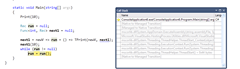

t3

Second iteration: Stack frame - TPrint, but as we see there are no other calls to TPrint on the stack.
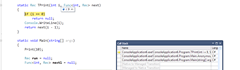
t4

Stack frame jumps up and down like a jumper on the trampoline.

Trampolined version of FileSystemWalker

    public static class TrampolinedFileSystemWalker
{
public delegate TAcc FileInfoVisitor<TAcc>(FileInfo fileInfo, TAcc acc);
public delegate void VoidFileInfoVisitor<TAcc>(FileInfo fileInfo, TAcc acc);
public delegate void DirectoryInfoVisitor<TAcc>(DirectoryInfo directoryInfo, TAcc acc, Next<TAcc> next);
public delegate void Next<in TAcc>(TAcc acc);

public static T Walk<T>(string path, T seed, FileInfoVisitor<T> fileVisitor, DirectoryInfoVisitor<T> directoryVisitor)
{
return Directory.Exists(path)
? Walk(new DirectoryInfo(path), seed, fileVisitor, directoryVisitor)
: seed;
}

private static T Walk<T>(FileSystemInfo fsi, T seed, FileInfoVisitor<T> fileVisitor, DirectoryInfoVisitor<T> directoryVisitor)
{
var value = seed;
var actions = new Queue<Action>();

Action<FileSystemInfo> processOne = null;
processOne = currFsi =>
{
if (currFsi is FileInfo)
{
value = fileVisitor((FileInfo) currFsi, value);
}
else
{
var di = (DirectoryInfo) currFsi;
directoryVisitor(
di,
value,
newValue =>
{
value = newValue;
foreach (var nested in di.EnumerateFileSystemInfos())
{
var n = nested;
actions.Enqueue(() => processOne(n));
}
}
);
}
};
actions.Enqueue(() => processOne(fsi));
while (actions.Any())
actions.Dequeue()();

return value;
}

public static void Walk<T>(string path, T seed, VoidFileInfoVisitor<T> fileVisitor, DirectoryInfoVisitor<T> directoryVisitor)
{
if (Directory.Exists(path))
Walk(new DirectoryInfo(path), seed, fileVisitor, directoryVisitor);
}

private static void Walk<T>(FileSystemInfo fsi, T seed, VoidFileInfoVisitor<T> fileVisitor, DirectoryInfoVisitor<T> directoryVisitor)
{
var actions = new Queue<Action>();

Action<FileSystemInfo, T> processOne = null;
processOne = (currFsi, value) =>
{
if (currFsi is FileInfo)
{
fileVisitor((FileInfo)currFsi, value);
}
else
{
var di = (DirectoryInfo)currFsi;
directoryVisitor(
di,
value,
newValue =>
{
foreach (var nested in di.EnumerateFileSystemInfos())
{
var n = nested;
actions.Enqueue(() => processOne(n, newValue));
}
}
);
}
};
actions.Enqueue(() => processOne(fsi, seed));
while (actions.Any())
actions.Dequeue()();
}
}

It is a bit more complex than previous sample, every call can lead to many recursive calls, so we replace single delegate with a queue of actions. Each step can put as many actions as it need and all calls shall be made one after another using fixed amount of stack frames.

static void CopyFolder(string path, string destPath)
{
FileSystemWalker.Walk(
path,
destPath,
(fi, dir) => fi.CopyTo(Path.Combine(dir, fi.Name)),
(di, dir, next) =>
{
var newPath = Path.Combine(dir, di.Name);
if (!Directory.Exists(newPath))
Directory.CreateDirectory(newPath);

next(newPath);
}
);
}

static void TCopyFolder(string path, string destPath)
{
TrampolinedFileSystemWalker.Walk(
path,
destPath,
(fi, dir) => fi.CopyTo(Path.Combine(dir, fi.Name)),
(di, dir, next) =>
{
var newPath = Path.Combine(dir, di.Name);
if (!Directory.Exists(newPath))
Directory.CreateDirectory(newPath);

next(newPath);
}
);
}

static long CalculateSize(string path)
{
return FileSystemWalker.Walk(
path,
0L,
(fi, acc) => acc + fi.Length,
(di, acc, next) => next(acc)
);
}
static long TCalculateSize(string path)
{
return TrampolinedFileSystemWalker.Walk(
path,
0L,
(fi, acc) => acc + fi.Length,
(di, acc, next) => next(acc)
);
}

Client code was isolated from details of traverse so it was unaffected by fundamental changes we made.

вторник, 23 марта 2010 г.

Solving Python Challenge with F# - The Chronicles

Recently I have tested my skills in Python Challenge and I definitly recommend this set of puzzles to everyone who likes quests and/or programming. Some of riddles require usage of Python standard library but others can be easily solved with arbitrary language. So my Python challenge was in fact Python/F# :)

WARNING!!! If you are going to pass through the Python challenge then stop reading this post, cause it contains solution to 24 level.

24 level meets you with this picture

maze

Ex facte it looks like the labyrinth. Let't try to find the path, window title 'from top to bottom' contains the hint about traverse direction. Examination of the picture with a zoom reveals start and end points: 639,0 and 1,640 correspondingly.

#r "System.Drawing"

open System.Drawing

let wall = Color.FromArgb(255,255,255,255) // color of the wall
let bitmap = Image.FromFile(@"maze.png") :?> Bitmap
let findPath () =
let startx = 639
let starty = 0
let endx = 1
let endy = 640

let map = Array2D.zeroCreate (bitmap.Width) (bitmap.Height)
let rec mark i x y k =
// out of range
if x < 0 || x > bitmap.Width - 1 then k None
elif y < 0 || y > bitmap.Height - 1 then k None
// found exit
elif x = endx && y = endy then k <| Some([x,y])
// already visited
elif map.[x, y] then k None
// hit the wall
elif bitmap.GetPixel(x, y).Equals(wall) then k None
else
map.[x,y] <- true
mark (i + 1) (x - 1) y (function
| Some(xs) -> k <| Some((x,y)::xs)
| None -> mark (i + 1) (x + 1) y (function
| Some(xs) -> k <| Some((x,y)::xs)
| None -> mark (i + 1) x (y - 1) (function
| Some(xs) -> k <| Some((x,y)::xs)
| None -> mark (i + 1) x (y + 1) (function
| Some(xs) -> k <| Some((x,y)::xs)
| None -> k None
)
)
)
)

Option.get <| mark 1 startx starty id


To search the path we will use simple depth-first search. All visited points are marked in the map to prevent repeated visits. Algorithm itself is implemented in recursive way with continuations to avoid stack overflows.

val wall : System.Drawing.Color = Color [A=255, R=255, G=255, B=255]
val bitmap : System.Drawing.Bitmap
val findPath : unit -> (int * int) list

> #time;;

--> Timing now on

> let path = findPath ();;
Real: 00:00:00.392, CPU: 00:00:00.390, GC gen0: 2, gen1: 2, gen2: 0

Now we have the path and no idea what to do next. Maybe we should draw it on the source labyrinth?

let copy = bitmap.Clone() :?> Bitmap
path |> List.iter(fun (x,y) -> copy.SetPixel(x,y, Color.Green))
copy.Save(@"solved.png", Imaging.ImageFormat.Png)
solved

Impressive but useless... However as we have already noticed the picture is not monochrome, Maybe this can give us the clue? Let's walk through the path and save colours we met.

let f = System.IO.File.CreateText(@"path.txt")
path |> List.iter(fun(x,y) -> let px = bitmap.GetPixel(x,y) in f.WriteLine("{0},{1}: {2}, {3}, {4}, {5}", x, y, px.A, px.R, px.G, px.B))
f.Close()
639,0: 255, 0, 0, 0
639,1: 255, 80, 0, 0
639,2: 255, 0, 0, 0
639,3: 255, 75, 0, 0
639,4: 255, 0, 0, 0
639,5: 255, 3, 0, 0
639,6: 255, 0, 0, 0
639,7: 255, 4, 0, 0
639,8: 255, 0, 0, 0
639,9: 255, 20, 0, 0
639,10: 255, 0, 0, 0
639,11: 255, 0, 0, 0
638,11: 255, 0, 0, 0
637,11: 255, 0, 0, 0
636,11: 255, 0, 0, 0
635,11: 255, 0, 0, 0
635,12: 255, 0, 0, 0
635,13: 255, 8, 0, 0
635,14: 255, 0, 0, 0
635,15: 255, 0, 0, 0
635,16: 255, 0, 0, 0
635,17: 255, 136, 0, 0

That is definitly something! 1. Some special pixels in the path differ in the R component. 2. All these special pixels have odd both x and y coordinates. Obvious step: save R components of these pixels

let bytes = path |> Seq.filter(fun (x,y) -> x % 2 <> 0 && y % 2 <> 0) |> Seq.map(fun(x,y) -> bitmap.GetPixel(x,y).R) |> Seq.toArray
System.IO.File.WriteAllBytes(@"dmp.file", bytes)

What a surprise, result dmp.file is....zip file, after unpacking it we receive link to the next level.

четверг, 18 марта 2010 г.

F# and WPF or how to make life a bit easier

I like F#. It combines power of functional programming and features of OO languages so you can mix together most convinient features from both worlds. Ex facte it can appear as a esotheric language with unfriendly syntax (especially for fans of C-like languages) but after first week of using it you begin to notice the verbosity of other languages. In fact learning ways of solving problems in F# can make you better programmer on any imperative language you use, because it enforces another way of viewing the task.

Unfortunatly all pleasure of using F# is partially spoiled by level of language support in Visual Studio (comparing to C#). Absence of solution folders, requirement to order files in project (yes, I completely understand the reason but this doesn't mean that I like it), poor navigation possibilities, lack of designer support in WinForms and WPF - and I can keep on...

Not so long ago I was working of small F# script (excellent feature BTW) that performs some data processing and displays summary (using WPF)at the end. All the WPF samples I met in the web utilize object model to create UI, but let's make a confession: making relatively complex UI with object model sucks. It is possible to create complicted user interface from the code but this will take much more efforts than if we use XAML and designer. So I made a small helper that wires up together UI definition in XAML and externally defined behavior, i.e. event handlers.

module FSWpf

#r "WindowsBase"
#r "PresentationCore"
#r "PresentationFramework"
#r "System.Xaml"

open System
open System.Windows

[<AttributeUsage(AttributeTargets.Field, AllowMultiple = false)>]
type UiElementAttribute(name : string) =
inherit System.Attribute()
new() = new UiElementAttribute(null)
member this.Name = name

[<AbstractClass>]
type FsUiObject<'T when 'T :> FrameworkElement> (xamlPath) as this =
let loadXaml () =
use stream = System.IO.File.OpenRead(xamlPath)
System.Windows.Markup.XamlReader.Load(stream)
let uiObj = loadXaml() :?> 'T

let flags = System.Reflection.BindingFlags.Instance ||| System.Reflection.BindingFlags.NonPublic ||| System.Reflection.BindingFlags.Public

do
let fields =
this.GetType().GetFields(flags)
|> Seq.choose(fun f ->
let attrs = f.GetCustomAttributes(typeof<UiElementAttribute>, false)
if attrs.Length = 0 then None
else
let attr = attrs.[0] :?> UiElementAttribute
Some(f, if String.IsNullOrEmpty(attr.Name) then f.Name else attr.Name)
)
for field, name in fields do
let value = uiObj.FindName(name)
if value <> null then
field.SetValue(this, value)
else
failwithf "Ui element %s not found" name

member x.UiObject = uiObj

The helper is very small and simple: it loads XAML file, iterates over annotated fields (should be declared by inheritors) and puts reference to UI element into corresponding field.

XAML file can be created with File -> New -> File -> Xml File. Just change extension to xaml and add declaration of required namespaces in the beginning. After that you can use VS designer. My sample xaml file is not the beautiful masterpiece, its rather the opposite but it demonstrates the simplicity of creating complex UI parts. Believe me, the same thing expressed in code looks much more confusing.

<Window  xmlns="http://schemas.microsoft.com/winfx/2006/xaml/presentation"
xmlns:x="http://schemas.microsoft.com/winfx/2006/xaml"
Title="Main window" Width="200" Height="300" SizeToContent="WidthAndHeight">
<StackPanel Margin="10">
<Rectangle
Name="MyRectangle"
Width="100"
Height="100"
Fill="Blue">
<Rectangle.Triggers>
<!-- Animates the rectangle's opacity. -->
<EventTrigger RoutedEvent="Rectangle.Loaded">
<BeginStoryboard>
<Storyboard>
<DoubleAnimation
Storyboard.TargetName="MyRectangle"
Storyboard.TargetProperty="Opacity"
From="1.0" To="0.0" Duration="0:0:5"
AutoReverse="True" RepeatBehavior="Forever" />
</Storyboard>
</BeginStoryboard>
</EventTrigger>
</Rectangle.Triggers>
</Rectangle>
<Button Content="Run!!!" Height="23" Width="75" x:Name="run">
<Button.Triggers>
<EventTrigger RoutedEvent="Button.Loaded">
<BeginStoryboard>
<Storyboard>
<DoubleAnimation
Storyboard.TargetName="run"
Storyboard.TargetProperty="Width"
From="50.0" To="10.0" Duration="0:0:5"
AutoReverse="True" RepeatBehavior="Forever" />
</Storyboard>
</BeginStoryboard>
</EventTrigger>
</Button.Triggers>
</Button>
<TextBox Height="23" Width="120" x:Name="text">
</TextBox>
</StackPanel>
</Window>

Finally: usage

#load "FsUiObject.fsx"

open FSWpf

open System.Windows
open System.IO

type MainWindow() as this =
inherit FsUiObject<Window>(Path.Combine(__SOURCE_DIRECTORY__, "MainWindow.xaml"))

[<DefaultValue>]
[<UiElement("run")>]
val mutable runButton : Controls.Button

[<DefaultValue>]
[<UiElement>]
val mutable text : Controls.TextBox

let clickHandler _ =
let txt = this.text.Text
MessageBox.Show(this.UiObject, txt) |> ignore

do
this.runButton.Click.Add(clickHandler)
let window = new MainWindow()
window.UiObject.ShowDialog() |> ignore

Derived class just declares fields (runButton and text) and base class (FsUiObject) is responsible for mapping this fields to UI elements. That’s all.

Data structures: Finger Tree (Part 1.5)

Last time we stopped on “immutable deque” stage. Today we will explore a few additions that can endow deque with super (hmm..human/deque?) powers.

Random access

One of the most popular and claimed abilities of data structures nowadays is random access. The BCL leader in this category is undoubtedly List (O(1)), in opposite LinkedList has the worst results - O(N). What should we change in structure of the tree to make it support random access? Surprisingy - a little. Let's describe this on the simplified sample with binary tree containing data in the leaf nodes.

annotated_tree

To extend tree with efficient random access capabilities we will annotate all nodes with its size. Size of leaf node is always 1 and size of non-leaf = sum of sizes of its immediate children. The change we made is seems to be minor but this is the one that adds very important features:

  • Annotation on the top level returns total number of items in tree
  • Accessing element by index boils down to recursive descent plus optional index fixup.

For example we want to take element with index 3 (starting with 0) from the tree gived in sample above .First of all we need to ensure that required index belongs to tree. Index(3) is lesser than size of root node (7) so it is definitely in tree.

Step 1: Node – root (7), index 3 and we need to select one of subnodes. Size of left subnode 5, so it contains index range [0..4]. Required index fall within this range then we move to the left with index unchanged.

Step 2: Node (5), index – 3. Size of left subnode 2 and now it is lesser than required index -we select right subnode. Index is fixed  according to the rule:new-index = old-index – size-of-left-subnode 

Step 3: Node (3), index 1  and it is once again greated than size of left subtree. We know what to do: move to the right, fix index

Step 4: Node (2), index 0, it is lesser then size of left subnode (1) – move to the left without touching index.

Step 5: We’ve reached the leaf – success!!!

Picture below illustrates process of descending step by step. Number in yellow brick – index on current stage.

find

type Tree<'T> = 
| Leaf of 'T
| Node of int * Tree<'T> * Tree<'T>

let size = function
| Leaf _ -> 1
| Node (s, _, _) -> s

let leaf v = Leaf v
let node l r = Node(size l + size r, l, r)

let rec find i = function
| Leaf v when i = 0 -> v
| Node(_, l, r) ->
let ls = size l
if i < ls then find i l
else find (i - ls) r
| _ -> failwith "incorrect index"

let tree = node (node (node (leaf 1) (leaf 2)) (node (leaf 3) (node (leaf 4) (leaf 5)))) (node (leaf 6) (leaf 7))
let res = find 3 tree // 4

Note: we’ve used custom function node instead of constructor Node to automatically calculate size of non-leaf nodes. Such functions that do something besides simple constructor calls are usually named smart constructors

If the tree is balanced (and finger tree is always balanced) then such implementation of random access will be O(log(N)).

Max-priority queue

Let’s consider another problem, we need data structure that stores items with associated values (priorities) and provides efficient access to element with maximum priority.

To extend tree with such capabilities we will annotate all nodes (I know that it sounds familiar). In this case value of annotation in every leaf node shall be value of priority itself. As for the non-leafs - they shall be annotated with value of maximum priority it contains. The concept of solution remains the same: we travel from top to bottom of the tree, on every non-leaf level we select one of subnodes that contains maximum priority. When leaf node is reached – success.

type Tree<'T> = 
| Leaf of int * 'T
| Node of int * Tree<'T> * Tree<'T>

let priority = function
| Leaf (p, _) -> p
| Node (s, _, _) -> s

let leaf v = Leaf v
let node l r = Node(max (priority l) (priority r), l, r)

let rec find = function
| Leaf(_, v) -> v
| Node(_, l, r) ->
let lp = priority l
let rp = priority r
if lp > rp then find l
else find r

let tree = node (node (node (leaf (5, 2)) (leaf (3,3))) (node (leaf (10, 5)) (node (leaf (11, 6)) (leaf (2, 9))))) (node (leaf (4, 10)) (leaf (7, 12))) // 6

Efficiency of this version also depends on the fact whether tree is balanced and in the best case it is O(log(N)).

As you may notice the structure of the tree remains almost the same (in fact we can use it in random access sample too and just assign constant size to Leaf in leaf smart constructor). The only thing that changed is annotation. To unify both implementation we need associative binary function for combining values (ie (+) or max) and some kind of zero value that can be combined with any other value (V) from the domain and return V unchanged. Google prompts the answer - this is monoid. For random access monoid components are mapped on (+) as Combine and 0 as Zero. For max-priority queue Zero is int.MinValue and Combine - max. Code below illustrates possible implementation of unified approach in F#

type IMeasured<'V> = 
abstract Value : 'V

let measure (v : #IMeasured<_>) = v.Value

type IMonoid<'V> =
abstract Zero : 'V
abstract Plus : 'V -> 'V -> 'V

type Singleton<'T when 'T : (new : unit -> 'T)> private () =
static let instance = new 'T()
static member Instance = instance

type Tree<'T, 'M, 'V when 'M :> IMonoid<'V> and 'M : (new : unit -> 'M) and 'T :> IMeasured<'V>> =
| Leaf of 'T
| Node of 'V * Tree<'T, 'M, 'V> * Tree<'T, 'M, 'V>
interface IMeasured<'V> with
member x.Value =
let monoid = Singleton<'M>.Instance
match x with
| Leaf v -> v.Value
| Node(v, _, _) -> v

let node<'T, 'V, 'M when 'M :> IMonoid<'V> and 'M : (new : unit -> 'M) and 'T :> IMeasured<'V>> (l : Tree<'T, 'M, 'V>) (r : Tree<'T, 'M, 'V>) =
let monoid = Singleton<'M>.Instance
Node(monoid.Plus (measure l) (measure r), l, r)

[<RequireQualifiedAccess>]
module RandomAccess =
type Monoid() =
interface IMonoid<int> with
member this.Zero = 0
member this.Plus a b = a + b
type Element<'T> =
{ Value : 'T}
interface IMeasured<int> with
member this.Value = 1

let createLeaf v = Tree<Element<_>, Monoid, int>.Leaf ({Value = v})
let createNode l r= node<Element<_>, int, Monoid> l r
let rec nth i = function
| Leaf {Value = v} when i = 0 -> v
| Node(_, l, r) ->
let ls = measure l
if i < ls then nth i l
else nth (i - ls) r
| _ -> failwith "invalid index"

[<RequireQualifiedAccess>]
module Priority =
type Monoid() =
interface IMonoid<int> with
member this.Zero = System.Int32.MinValue
member this.Plus a b = max a b
type Element<'V> =
{ Prio : int
Value : 'V }
interface IMeasured<int> with
member this.Value = this.Prio

let createLeaf = Tree<_, Monoid, int>.Leaf
let createNode l r= node<Element<_>, int, Monoid> l r
let rec find = function
| Leaf ({Value = v}) -> v
| Node(_, l, r) ->
let ls = measure l
let rs = measure r
if ls < rs then find r
else find l

Next time we will link together implementation of finger trees and power-ups from todays post.

пятница, 12 марта 2010 г.

F# and Iron Python

Iron Python - .NET implementation of Python, tightly integrated with .NET framework, has a wide range of applications. It can be used as an embedded scripting language, as a full-fledged language for creating complex apps and as a bridge for reusing existing Python code in managed programs. The latter benefit is very important because Python offers huge amount of various libraries distributed as a source code and significant part of it can be used with Iron Python (maybe with few minor changes).

Today’s post will be devoted to various ways of integration between Iron Python and F#. I’ll try to skip the details of DLR configuration, because this is vast topic that worth separate post (maybe even a few posts). Instead I’ll focus on questions of integration. All samples were created and tested with VS 2010 and Iron Python 6.1 RC for .NET 4.0. First part for all the samples is the same: create new console F# project and add references to IronPython, Microsoft.Dynamic and Microsoft.Scripting.

Running standalone script. This task is trivial and needs no comments.

open IronPython.Hosting

let python = Python.CreateEngine() // create Python script engine with default settings
let script = @"
def fact(x) :
return x > 1 and x * fact( x - 1) or 1
print fact(5)
"
python.Execute(script) |> ignore;

120

Brilliant, first success. However this script is mostly useless, because it cannot accept parameters and return values. Of course it is possible to use some external stuff like files for passing\returning values or insert parameters by declaring placeholders in script and then applying something like printf or string.Format but IMO both approaches are non-elegant,heavy-weighted and error-prone. We will make everything in a more accurate way.

Scopes and delegates. There is a term scope in Python, it defines visibility of name. Roughly speaking scope is a dictionary that maps name to instance. Scopes are organized in hierarchy and if request for name was not satisfied in child scope - the call will be delegated to parent. In previous sample we didn't create the scope, so engine makes it implicitly. Next sample will create scope explititly.

open System
open IronPython.Hosting

let python = Python.CreateEngine() // create Python script engine with default settings
let script = @"
class A(object) :
def __init__(self, x, y) :
self.x = x
self.y = y
def write(self) :
print ""x=%s, y=%s"" %(self.x, self.y)

def create(x, y) :
return A(x, y)

def write(s) :
s.write()
"
let scope = python.CreateScope()

python.Execute(script, scope) |> ignore;
for name in scope.GetVariableNames() do
printfn "%s" name
let create = scope.GetVariable<Func<_, _, obj>>("create")
let write = scope.GetVariable<Action<obj>>("write")

let o = create.Invoke(1, "!")
do write.Invoke(o)


__builtins__
__file__
__name__
__doc__
A
create
write
x=1, y=!

Script execution doesn't produce any result, instead it will add names A, create and write to scope. After execution we can extract corresponding values from scope, DLR will automatically convert them to required type. In out case we obtain two delegates, one acts as a factory, another invokes some hardcoded method on given instance.

Direct access. This approach is also not flawless, the necessity to create a function for every method in type is extermly annoying: if I already has instance returned by factory, why cannot I invoke method directly. And in fact I can, DLR allows doing it through using Operations set provided by concrete ScriptEngine. We can combine this fact with F# dynamic lookup operator and make something ve-e-ery interesting.

open System
open IronPython.Hosting
open Microsoft.FSharp.Reflection

let python = Python.CreateEngine() // create Python script engine with default settings
let (?) (o : obj) m : 'Result =
if FSharpType.IsFunction typeof<'Result>
then
// if it was function call then we need to take requested callable member from instance
let func = python.Operations.GetMember(o, m)
let domain, _ = FSharpType.GetFunctionElements(typeof<'Result>)
let getArgs =
if domain = typeof<unit> then fun _ -> [||]
elif FSharpType.IsTuple domain then fun a -> FSharpValue.GetTupleFields(a)
else fun a -> [|a|]

downcast FSharpValue.MakeFunction(typeof<'Result>, fun args ->
python.Operations.Invoke(func, getArgs(args))
)
else
downcast python.Operations.GetMember(o, m)

let (?<-) (o : obj) m v =
python.Operations.SetMember(o, m, v)

let script = @"
class A(object) :
def __init__(self, x, y) :
self.x = x
self.y = y
def write(self, prefix) :
print ""%s: x=%s, y=%s"" %(prefix, self.x, self.y)

A(100, 100)
"
let a = python.Execute(script);
a?y <- 500
a?write("Test")
printfn "%d" a?x


Test: x=100, y=500
100

As you may notice we've made few changes in script to simplify it: all functions are removed and now it returns instance of A as a result. Implementation of (?<-) is pretty simple but (?) may need some comments:

  • 'Result type defines what member should be invoked.
  • Functions and properties are processed separately: properties are accessed via calling GetMember operation on given instance. Functions are processed in two steps: first - get callable member, second - perform call with it.
  • Arguments processing forks in 3 cases. Unit arguments are represented as null, instead of null we need to pass empty array. Single argument follows as it is and tupled arguments should be unpacked from tuple and put into array.

Note: this version also needs improvements, now dynamic lookup operator is tightly bound to particular instance of ScriptEngine, and this is bad. This can be solved by using technique similar to C# 4.0 compiler: create DLR call sites, use binder etc. This fix shall be the subject for one of my next posts.

We can take values from scope right? Right! But who can forbid us to put some predefined items in scope and refer to them in script? Nobody! And this is perfectly valid approach to invoke existing managed code from Iron Python script. Its worth noting that Iron Python have access to all the might of BCL, all you need to do is import clr module.

open System
open IronPython.Hosting
open Microsoft.FSharp.Reflection

let python = Python.CreateEngine() // create Python script engine with default settings
let (?) (o : obj) m : 'Result =
if FSharpType.IsFunction typeof<'Result>
then
// if it was function call then we need to take requested callable member from instance
let func = python.Operations.GetMember(o, m)
let domain, _ = FSharpType.GetFunctionElements(typeof<'Result>)
let getArgs =
if domain = typeof<unit> then fun _ -> [||]
elif FSharpType.IsTuple domain then fun a -> FSharpValue.GetTupleFields(a)
else fun a -> [|a|]

downcast FSharpValue.MakeFunction(typeof<'Result>, fun args ->
python.Operations.Invoke(func, getArgs(args))
)
else
downcast python.Operations.GetMember(o, m)

let (?<-) (o : obj) m v =
python.Operations.SetMember(o, m, v)

type public SomeVeryUsefulType() =
member x.write(path, content) = System.IO.File.WriteAllText(path, content)
type AlsoUsefulStaticType =
static member read(path) = System.IO.File.ReadAllText(path)

let script = @"
import clr

from System.IO import Path

class A(object) :
def write(self) :
tempPath = Path.GetTempFileName() // direct access to BCL
writer.write(tempPath, ""Hi from Iron Python"")
return ReaderType.read(tempPath)
A()
"
let scope = python.CreateScope()
scope.SetVariable("writer", SomeVeryUsefulType())
scope.SetVariable("ReaderType", IronPython.Runtime.Types.DynamicHelpers.GetPythonTypeFromType(typeof<AlsoUsefulStaticType>))
let a = python.Execute(script, scope);

printfn "%s" (a?write())

Hi from Iron Python

The sample shows that we can equally successfully give IronPython instance and types. The entire picture will be incomplete without mentioning possibility to create whole Python modules in managed code. It is irreplaceable feature because many native Python libraries is implemented in C and cannot be used in Iron Python directly.

open System
open IronPython.Hosting
open IronPython.Runtime

open System.Net

type public FSWeb =
static member download(ctx : CodeContext, uri : string) =
let req = HttpWebRequest.Create(uri)
let resp = req.GetResponse()
use stream = resp.GetResponseStream()
use reader = new System.IO.StreamReader(stream)
reader.ReadToEnd()

// annotation of managed Python module in current assembly
[<assembly : PythonModule("fsweb", typeof<FSWeb>)>]
do()

let script = @"
import fsweb
fsweb.download(""http://google.com"")
"
let python = Python.CreateEngine()

python.Runtime.LoadAssembly(typeof<FSWeb>.Assembly)
let content : string = downcast python.Execute(script)
printfn "size: %d" content.Length

size: 7110

 
GeekySpeaky: Submit Your Site!